
Field note · 2026
Skill System 原理与实践:从架构设计到工程实现
Skill System 是 Hermes Agent 和 Claude Code 的核心能力之一。它将领域知识、工作流和工具能力封装为可复用模块,通过渐进式披露平衡了可用性与 token 效率——启动时只加载技能元数据(约 3k tokens),使用时才读取完整内容。
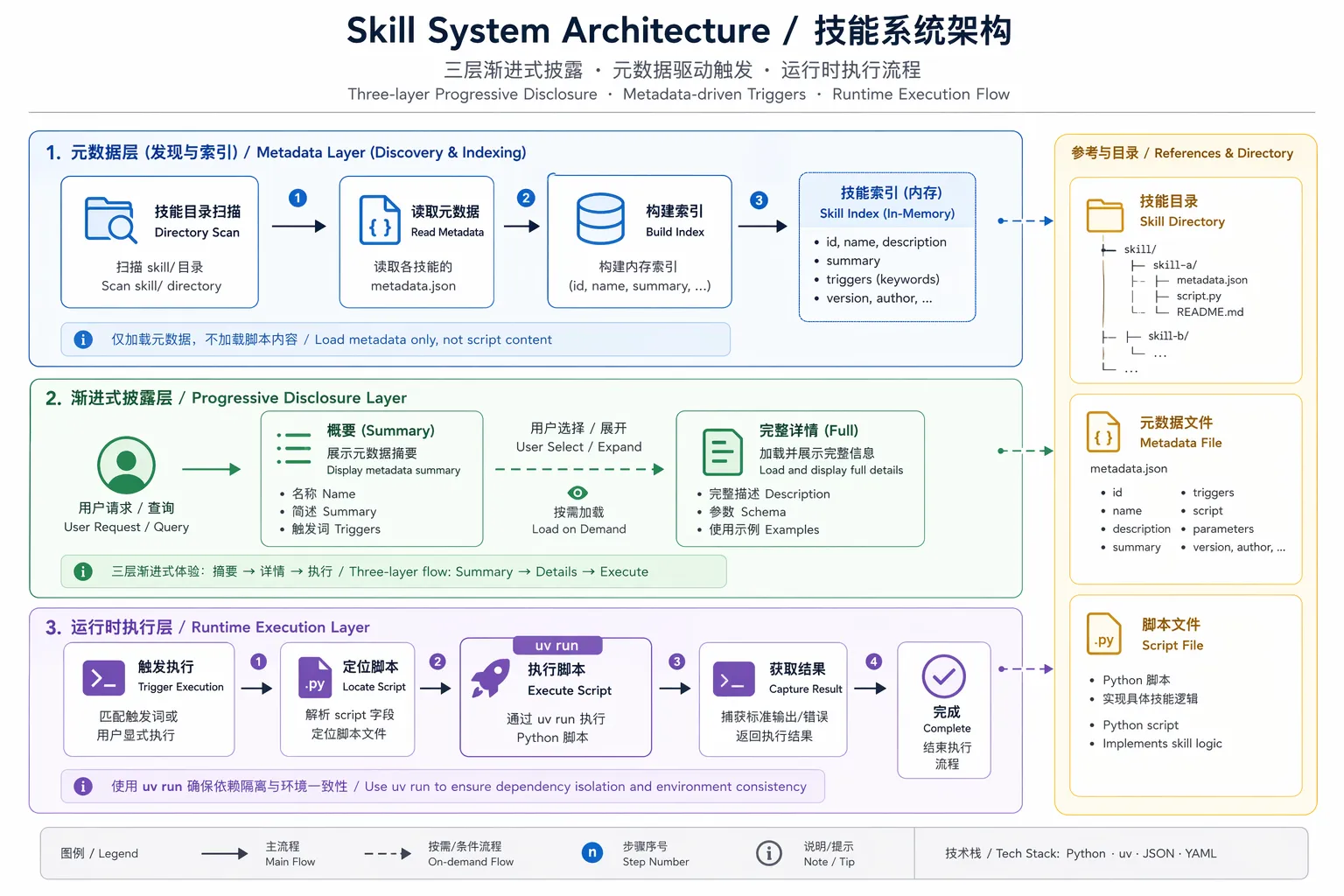
Skill System 是 Hermes Agent 和 Claude Code 的核心能力之一。它将领域知识、工作流和工具能力封装为可复用模块,通过渐进式披露平衡了可用性与 token 效率——启动时只加载技能元数据(约 3k tokens),使用时才读取完整内容。
本文结合 writing-agent-harness 项目实践,深度解析 Skill System 的设计原理、工程实现与最佳实践。
一、核心设计理念
1.1 设计原则
Skill System 的设计遵循五个核心原则:
- 渐进式披露(Progressive Disclosure):三层加载机制,只在需要时加载对应层级内容
- 单一真实来源:
~/.hermes/skills/是唯一的读写主目录 - 外部目录扩展:
external_dirs是只读扩展,除非目录本身可写 - 本地优先:同名技能本地版本静默胜出,避免意外覆盖
- 插件命名空间:
namespace:skill格式隔离插件技能
1.2 Token 效率权衡
渐进式披露的核心是在”总能找到技能”和”不浪费 token”之间找到平衡:
Level 0: skills_list()    → 仅元数据 (~3k tokens,启动时固定成本)
Level 1: skill_view(name) → 完整内容(通常 10-100k tokens,边际成本)
Level 2: skill_view(name, path) → 特定参考文件(可变,按需加载)
Level 0 的 ~3k tokens 是会话启动时就会支付的固定成本;Level 1 和 Level 2 是边际成本,只有使用特定技能时才会产生。这种设计使得系统在拥有数百个技能的同时,仍能保持合理的 token 使用量。
二、目录结构与索引机制
2.1 标准技能目录布局
~/.hermes/skills/
├── category/
│   └── skill-name/
│       ├── SKILL.md          # 主文件,必需
│       ├── references/       # 参考文档(按需加载)
│       ├── templates/        # 模板文件
│       ├── scripts/          # 辅助脚本
│       ├── evals/            # 评估用例
│       └── assets/           # 资源文件
├── .hub/                     # Hub 本地状态
│   ├── lock.json
│   ├── quarantine/
│   └── audit.log
├── .bundled_manifest         # 捆绑技能内容哈希清单
└── .archive/                 # 归档目录
2.2 索引机制:无预构建,按需扫描
Hermes 不使用 SQLite 或 JSON 索引数据库。每次 skills_list() 都会重新扫描文件系统:
# 来自 agent/skill_utils.py
def iter_skill_index_files(skills_dir: Path, filename: str):
    """遍历技能目录,返回匹配的文件路径"""
    for root, dirs, files in os.walk(skills_dir, followlinks=True):
        # 实时过滤:原地修改 dirs 列表,避免递归进入排除目录
        dirs[:] = [d for d in dirs if d not in EXCLUDED_SKILL_DIRS]
        if filename in files:
yield Path(root) / filenameEXCLUDED_SKILL_DIRS = frozenset((
".git", ".github", ".hub", ".archive",
".venv", "venv", "node_modules", "site-packages",
"__pycache__", ".tox", ".nox", ".pytest_cache",
".ruff_cache", ".mypy_cache"
))没有缓存,每次都重新扫描。这在技能数量 < 1000 时完全可接受。
其他设计细节:
- 使用
os.walk(followlinks=True),支持软链接 - 原地修改
dirs[:]列表,避免递归进入排除目录(这是os.walk()的标准优化技巧) .bundled_manifest记录的是内容哈希,不是修改时间:避免时间漂移导致的误更新
2.3 project-level 技能:writing-agent-harness 实践
在 writing-agent-harness 项目中,我们使用项目级技能目录:
.agents/skills/
├── article-ideation/
│   └── SKILL.md
├── article-illustration/
│   ├── SKILL.md
│   └── scripts/
│       └── generate_article_illustration.py
├── polish-article/
│   └── SKILL.md
├── wechat-article-renderer/
│   └── SKILL.md
└── wechat-publish-workflow/
    └── SKILL.md
通过配置 Hermes 的 external_dirs,这些技能可以直接被加载使用,无需复制。更重要的是:Agent 在会话中修改这些技能时,会直接更新 Git 仓库中的文件。
三、渐进式披露详解
3.1 Level 0: 技能列表(skills_list)
这是启动时的第一层加载,目的是让 Agent 知道有哪些技能可用,但不加载具体内容。
完整流程:
flowchart TD
    A[调用 skills_list] --> B[获取所有技能目录]
    B --> C[本地 ~/.hermes/skills]
    B --> D[外部 external_dirs]
    C --> E[遍历 SKILL.md]
    D --> E
    E --> F[解析 YAML frontmatter]
    F --> G[平台兼容性检查]
    G --> H[环境匹配检查]
    H --> I[禁用列表检查]
    I --> J[条件激活检查]
    J --> K[生成缩略元数据]
K --> L[排序并返回]关键代码(tools/skills_tool.py):
def skills_list():
    """返回所有可用技能的元数据列表"""
    # 1. 收集所有技能
    skills = _find_all_skills()

    # 2. 应用过滤器
    filtered = []
    for skill in skills:
        if not skill_matches_platform(skill["frontmatter"]):
            continue
        if not skill_matches_environment(skill["frontmatter"]):
            continue
        if skill["name"] in get_disabled_skill_names():
            continue
        if not _skill_matches_conditions(skill["frontmatter"]):
            continue
        filtered.append(skill)

    # 3. 只返回必要字段
return _sort_skills(filtered)返回的元数据结构:
{
  "name": "skill-name",
  "description": "Brief description...",
  "category": "category-name",
  "tags": ["tag1", "tag2"]
}
3.2 Level 1: 完整技能加载(skill_view)
当用户明确调用某个技能时,才加载完整内容。
名称解析策略(四种策略,按优先级):
# 策略1: 直接路径
direct_path = search_dir / name
if direct_path.is_dir() and (direct_path / "SKILL.md").exists():
    return direct_path / "SKILL.md"

# 策略2: 递归按目录名
for found_skill_md in iter_skill_index_files(search_dir, "SKILL.md"):
    if found_skill_md.parent.name == name:
        return found_skill_md

# 策略3: 按 frontmatter 中的 name 字段
fm, _ = _parse_frontmatter(fm_content)
if fm.get("name") == name:
    return found_skill_md

# 策略4: legacy flat .md 文件
for found_md in search_dir.rglob(f"{name}.md"):
    if found_md.name != "SKILL.md":
return found_md名称冲突处理:
当多个技能有相同名称时,Hermes 不会静默选择,而是报错并列出所有匹配项:
if len(candidates) > 1:
    return json.dumps({
        "success": False,
        "error": f"Ambiguous skill name '{name}': {len(candidates)} skills match",
        "matches": [str(smd) for _, smd in candidates],
        "hint": "Use full relative path instead"
})完整加载流程:
flowchart TD
    A[调用 skill_view(name)] --> B{检查命名空间?}
    B -->|是: plugin:skill| C[插件技能路径]
    B -->|否| D[本地/外部搜索]
    D --> E[构建搜索路径列表]
    E --> F[策略1: 直接路径]
    E --> G[策略2: 目录名递归]
    E --> H[策略3: frontmatter name]
    E --> I[策略4: legacy .md]
    F --> J{找到多个?}
    G --> J
    H --> J
    I --> J
    J -->|是| K[报错: 名称冲突]
    J -->|否| L[读取 SKILL.md]
    L --> M[解析 frontmatter]
    M --> N[平台检查]
    N --> O[前置处理]
    O --> P[模板变量替换]
    P --> Q[内联 shell 执行]
    Q --> R[注入配置值]
    R --> S[返回完整内容]
3.3 Level 2: 参考文件加载
当技能需要额外参考资料时,可以按需加载特定文件:
skill_view("skill-name", "references/api.md")这会加载技能目录内的指定文件,而不是整个技能。对于包含大量参考资料的技能,这种设计可以显著节省 token。
四、外部目录解析:缓存设计
4.1 配置读取与缓存
_EXTERNAL_DIRS_CACHE: Dict[Tuple[str, int], List[Path]] = {}

def get_external_skills_dirs() -> List[Path]:
    """读取配置中的外部目录,带 mtime 缓存"""
    config_path = get_config_path()
    if not config_path.exists():
        return []

    # 缓存键:(绝对路径, mtime_ns)
    try:
        stat = config_path.stat()
        cache_key = (str(config_path), stat.st_mtime_ns)
    except OSError:
        cache_key = None

    if cache_key is not None and cache_key in _EXTERNAL_DIRS_CACHE:
        return list(_EXTERNAL_DIRS_CACHE[cache_key])

    # 解析配置
    parsed = yaml_load(config_path.read_text())
    raw_dirs = parsed.get("skills", {}).get("external_dirs", [])

    # 展开路径
    result = []
    seen = set()
    for entry in raw_dirs:
        expanded = os.path.expanduser(os.path.expandvars(entry))
        p = Path(expanded)
        if not p.is_absolute():
            p = (get_hermes_home() / p).resolve()
        else:
            p = p.resolve()
        if p == get_skills_dir().resolve():
            continue  # 跳过本地目录重复
        if p in seen:
            continue
        if p.is_dir():
            seen.add(p)
            result.append(p)

    if cache_key is not None:
        _EXTERNAL_DIRS_CACHE[cache_key] = list(result)
    return result
性能权衡:
stat()~2μs vs YAML 解析 ~85ms:两个数量级的差距- 缓存键使用
mtime_ns(纳秒级时间戳),不是mtime(秒级),避免时间粒度问题 - 每次都返回
list(cache)的副本,避免调用方意外修改缓存 - 缓存是进程级的,重启失效
4.2 路径展开规则
# 支持的展开:
- ~ → 用户目录
- ${VAR} → 环境变量
- $VAR → 环境变量(部分支持)

# 相对路径解析:
# 相对于 HERMES_HOME,不是当前工作目录
"relative/path" → get_hermes_home() / "relative/path"
相对路径相对于 HERMES_HOME 解析,这是一个合理的约定,但需要注意不要与当前项目目录混淆。
4.3 writing-agent-harness 配置示例
编辑 ~/.hermes/config.yaml:
skills:
  external_dirs:
- /Users/eriklee/code/my_project/writing-agent-harness/.agents/skills工作原理:
- 搜索顺序:
~/.hermes/skills/→external_dirs[0]→external_dirs[1]→ …… - 名称冲突:本地优先。相同技能名的外部版本会被静默忽略
- 读写行为:Agent 修改技能时,会更新该技能所在的原始目录(包括外部目录,如果可写)
- 容错:配置中不存在的目录会被静默跳过,不报错
五、条件激活机制
5.1 条件字段
技能可以根据工具集可用性自动显示或隐藏:
# 从 frontmatter 提取条件
def extract_skill_conditions(frontmatter: Dict):
    metadata = frontmatter.get("metadata", {})
    hermes = metadata.get("hermes", {})
    return {
        "fallback_for_toolsets": hermes.get("fallback_for_toolsets", []),
        "requires_toolsets": hermes.get("requires_toolsets", []),
        "fallback_for_tools": hermes.get("fallback_for_tools", []),
        "requires_tools": hermes.get("requires_tools", [])
    }
5.2 判断逻辑
flowchart LR
    A[技能显示?] --> B{requires_toolsets?}
    B -->|有且不可用| C[隐藏]
    B -->|可用或无| D{requires_tools?}
    D -->|有且不可用| C
    D -->|可用或无| E{fallback_for_toolsets?}
    E -->|有且可用| C
    E -->|不可用或无| F{fallback_for_tools?}
    F -->|有且可用| C
    F -->|不可用或无| G[显示]
5.3 用例:降级方案
# duckduckgo-search 技能
metadata:
  hermes:
    fallback_for_toolsets: [web]  # 仅在 web 工具集不可用时显示
当用户配置了 FIRECRAWL_API_KEY 时,web 工具集可用 → duckduckgo 隐藏; 当 API key 缺失时,web 工具集不可用 → duckduckgo 自动显示。
条件激活仅影响 skills_list() 和系统提示,不阻止显式调用 skill_view("hidden-skill")。
六、平台与环境匹配
6.1 平台匹配
def skill_matches_platform(frontmatter: Dict) -> bool:
    platforms = frontmatter.get("platforms")
    if not platforms:
        return True  # 默认所有平台

    current = sys.platform
    running_in_termux = is_termux()

    for platform in platforms:
        normalized = str(platform).lower().strip()
        mapped = PLATFORM_MAP.get(normalized, normalized)

        if current.startswith(mapped):
            return True
        # Termux 特殊处理
        if running_in_termux and mapped == "linux":
            return True
        if running_in_termux and mapped in ("termux", "android"):
            return True
return FalsePLATFORM_MAP = {
"macos": "darwin",
"linux": "linux",
"windows": "win32"
}6.2 环境匹配
_KNOWN_ENVIRONMENTS = frozenset({"kanban", "docker", "s6"})

def _detect_environment(env: str) -> bool:
    if env == "kanban":
        return (os.getenv("HERMES_KANBAN_TASK")
                or os.getenv("HERMES_KANBAN_BOARD")
                or _profile_has_kanban_toolset())
    elif env == "docker":
        return is_container()
    elif env == "s6":
        return os.path.isdir("/run/s6") or os.path.isdir("/package/admin/s6-overlay")
    return True  # 未知环境默认通过
七、技能内容前置处理
7.1 模板变量替换
# 支持的变量:
${HERMES_SKILL_DIR}  → 技能目录的绝对路径
${HERMES_SESSION_ID} → 当前会话 ID示例:
Run this script:
node ${HERMES_SKILL_DIR}/scripts/analyze.js
渲染为:
Run this script:
node /Users/erik/.hermes/skills/category/skill-name/scripts/analyze.js
7.2 内联 Shell 执行(可选)
配置启用:
skills:
  inline_shell: true
  inline_shell_timeout: 10  # 秒
使用:
Current date: !`date -u +%Y-%m-%d`
Git branch: !`git -C ${HERMES_SKILL_DIR} rev-parse --abbrev-ref HEAD`
执行后:
Current date: 2026-06-13
Git branch: main
八、配置注入机制
8.1 配置声明
技能在 frontmatter 中声明需要的配置:
metadata:
  hermes:
    config:
      - key: wiki.path
        description: Path to wiki directory
        default: ~/wiki
        prompt: Wiki directory path
8.2 配置解析
def resolve_skill_config_values(config_vars: List) -> Dict:
    """从 config.yaml 解析配置值"""
    config_path = get_config_path()
    config = {}
    if config_path.exists():
        try:
            parsed = yaml_load(config_path.read_text())
            if isinstance(parsed, dict):
                config = parsed
        except Exception:
            pass

    resolved = {}
    for var in config_vars:
        logical_key = var["key"]
        storage_key = f"skills.config.{logical_key}"
        value = _resolve_dotpath(config, storage_key)

        if value is None or (isinstance(value, str) and not value.strip()):
            value = var.get("default", "")

        # 展开路径
        if isinstance(value, str) and ("~" in value or "${" in value):
            value = os.path.expanduser(os.path.expandvars(value))

        resolved[logical_key] = value
    return resolved
8.3 注入到技能内容
当技能加载时,配置值会自动追加:
[Skill config (from ~/.hermes/config.yaml):
  wiki.path = /Users/erik/wiki
]

# 技能正文...
九、SKILL.md 格式规范
9.1 基本结构
---
name: skill-name                    # 必需:技能名称(用于调用)
description: Brief description      # 必需:简短描述(<1024 chars)
version: 1.0.0                      # 可选:版本号
author: Your Name                   # 可选:作者
license: MIT                        # 可选:许可证
platforms: [macos, linux]           # 可选:平台限制
metadata:
  hermes:
    tags: [tag1, tag2]              # 标签
    category: category-name         # 分类
    related_skills: [other-skill]   # 相关技能
    # 条件激活
    requires_toolsets: [web]        # 仅在特定工具集可用时显示
    requires_tools: [web_search]    # 仅在特定工具可用时显示
    fallback_for_toolsets: [web]    # 仅在特定工具集不可用时显示
    fallback_for_tools: [browser]   # 仅在特定工具不可用时显示
    # 配置项
    config:
      - key: my.path
        description: Path to something
        default: ~/default/path
        prompt: Enter the path
# 环境变量需求
required_environment_variables:
  - name: API_KEY
    prompt: Enter your API key
    help: Get one at https://example.com
    required_for: full functionality
---

# 技能标题

## When to Use
何时使用这个技能。

## Quick Reference
快速参考,常用命令等。

## Procedure
1. 步骤一
2. 步骤二

## Pitfalls
- 陷阱一:解决方案

## Verification
如何验证成功。
9.2 推荐章节结构
根据 writing-agent-harness 的实践,一个好的技能文档应该包含:
| 章节 | 用途 | 必需 |
|---|---|---|
Overview / When to Use | 何时使用,场景说明 | ✓ |
Quick Reference | 快速参考、常用命令 | |
Procedure / Workflow | 详细步骤 | |
Examples | 完整示例 | |
Pitfalls / Troubleshooting | 常见问题 | |
References | 参考资料链接 | |
Script Usage | 脚本调用说明(如果有) |
十、技能执行模式
10.1 模式 A:指令遵循模式(无脚本)
flowchart LR
    Start([触发技能]) --> Load[加载 SKILL.md]
    Load --> Parse[解析章节]
    Parse --> Follow[遵循指令执行]
    Follow --> UseRef{需要 references?}
    UseRef -->|是| LoadRef[加载 references/]
    UseRef -->|否| Continue
    LoadRef --> Continue([继续对话])
示例:article-ideation
- 无脚本,纯指令
- Agent 读取 SKILL.md 中的 Workflow 章节
- 按步骤执行:Restate → Calibrate → Offer Angles → Produce Brief
10.2 模式 B:脚本调用模式(有脚本)
flowchart TD
    Start([触发技能]) --> LoadSkill[加载 SKILL.md]
    LoadSkill --> ReadScript[阅读脚本说明]
    ReadScript --> BuildCmd[构建命令行]
    BuildCmd --> CheckAuth{检查认证?}
    CheckAuth -->|需要| PromptKey[提示输入 API Key]
    CheckAuth -->|不需要| Exec
    PromptKey --> Exec[执行: uv run script.py]
    Exec --> WaitOutput[等待输出]
    WaitOutput --> ReadMeta[读取元数据 JSON]
    ReadMeta --> Verify{验证成功?}
    Verify -->|是| Return[返回结果]
    Verify -->|否| HandleError[处理错误]
示例:gpt-image-2
# 脚本调用示例
uv run .agents/skills/gpt-image-2/scripts/gpt_image_2.py generate \
  --prompt "A cozy alpine cabin at dawn, mist over the lake" \
  --size landscape \
  --out output/gpt-image-2/cabin.png
让我们以 gpt-image-2 为例,看看一个完整的技能脚本架构:
flowchart TB
    subgraph "入口层"
        Main[main() 函数]
        ArgParse[argparse 解析]
        EnvLoad[加载 .env]
    end

    subgraph "命令层"
        Gen[generate]
        Edit[edit]
        Batch[generate-batch]
    end

    subgraph "核心层"
        Auth[认证管理]
        Model[模型解析]
        Size[尺寸验证]
        Prompt[提示词增强]
        Payload[请求构建]
    end

    subgraph "执行层"
        Client[OpenAI Client]
        Retry[重试逻辑]
        Progress[进度显示]
    end

    subgraph "输出层"
        Decode[Base64 解码]
        Write[写入文件]
        Meta[元数据 JSON]
        Downscale[可选缩放]
    end

    Main --> EnvLoad
    Main --> ArgParse
    ArgParse -->|command=generate| Gen
    ArgParse -->|command=edit| Edit
    ArgParse -->|command=generate-batch| Batch

    Gen --> Auth
    Gen --> Model
    Gen --> Size
    Gen --> Prompt
    Gen --> Payload
    Payload --> Client
    Client --> Retry
    Retry --> Progress
    Progress --> Decode
    Decode --> Write
    Decode --> Meta
Write --> Downscale# 1. 参数解析与验证
def main():
_load_dotenv() # 加载 .env 文件
parser = argparse.ArgumentParser(...)
subparsers = parser.add_subparsers(dest="command", required=True)
# generate 子命令
gen_parser = subparsers.add_parser("generate", ...)
_add_shared_args(gen_parser)
gen_parser.set_defaults(func=_generate)
args = parser.parse_args()
# 全局验证
if args.n < 1 or args.n > MAX_N:
_die(f"--n must be between 1 and {MAX_N}")
# 执行
return args.func(args)
# 2. 提示词增强
def _augment_prompt_fields(augment: bool, prompt: str, fields: dict):
if not augment:
return prompt # 直接返回原始提示词
sections = []
if fields.get("use_case"):
sections.append(f"Use case: {fields['use_case']}")
sections.append(f"Primary request: {prompt}")
if fields.get("scene"):
sections.append(f"Scene/backdrop: {fields['scene']}")
# ... 更多字段
return "\n".join(sections) # 组合增强后的提示词
# 3. API 调用与重试
async def _generate_one_with_retries(client, payload, attempts, job_label):
last_exc = None
for attempt in range(1, attempts + 1):
try:
return await _call_with_progress(
lambda: client.images.generate(**payload),
job_label,
started_at=time.time()
)
except Exception as exc:
last_exc = exc
if not _is_retryable_error(exc):
raise
# 指数退避重试
sleep_s = _extract_retry_after_seconds(exc) or min(60.0, 2.0 ** attempt)
await asyncio.sleep(sleep_s)
raise last_exc
# 4. 输出与元数据
def _meta(idx, path):
return {
"title": args.title,
"prompt": payload["prompt"],
"model": model_name,
"base_url": base_url,
"size": payload["size"],
"quality": payload["quality"],
"background": payload.get("background"),
"output_format": output_format,
"n": args.n,
"image_path": str(path),
"created_at": _now_iso(),
"dry_run": False,
}
# 写入图片和元数据
_decode_and_write(images, outputs, ..., write_metadata=True, metadata_factory=_meta)十一、技能组合与依赖管理
11.1 技能组合模式
模式 1:顺序流水线
flowchart LR
    A[article-ideation<br/>选题构思] --> B[deep-research<br/>深度调研]
    B --> C[polish-article<br/>文章润色]
    C --> D[article-readiness-check<br/>发布前检查]
    D --> E[wechat-article-renderer<br/>排版渲染]
    E --> F[wechat-article-publisher<br/>发布]
    F --> G[writing-task-closeout<br/>收尾归档]
模式 2:主技能 + 辅助技能
flowchart TB
    Main[wechat-publish-workflow<br/>主流程]
    Main --> R1[wechat-article-renderer<br/>渲染]
    Main --> R2[wechat-article-publisher<br/>发布]
    Main --> R3[article-illustration<br/>配图]
    R3 --> Dep1[gpt-image-2<br/>底层生成]
11.2 技能间引用机制
sequenceDiagram
    participant S1 as Skill A
    participant S2 as Skill B
    participant Agent as Agent

    S1->>Agent: "你可以使用 article-illustration 来生成图片"
    Agent->>Agent: 检查是否已加载 article-illustration

    alt 未加载
        Agent->>Agent: 按需加载 article-illustration
    end

    Agent->>S2: 调用 article-illustration 指令
    S2->>Agent: 返回结果
    Agent->>S1: 继续 Skill A 的执行
十二、插件技能系统
12.1 命名空间解析
def parse_qualified_name(name: str) -> Tuple[Optional[str], str]:
    """将 'namespace:skill-name' 拆分为 (namespace, bare_name)"""
    if ":" not in name:
        return None, name
    return tuple(name.split(":", 1))
12.2 插件技能加载流程
flowchart TD
    A[skill_view('plugin:skill')] --> B[解析命名空间]
    B --> C[发现插件]
    C --> D{插件存在?}
    D -->|否| E[尝试作为分类路径: plugin/skill]
    D -->|是| F[查找插件技能]
    F --> G{技能存在?}
    G -->|否| H[列出可用技能]
    G -->|是| I[读取 SKILL.md]
    I --> J[添加兄弟姐妹横幅]
    J --> K[前置处理]
    K --> L[返回内容]
12.3 插件技能横幅
当加载插件技能时,会自动添加上下文横幅:
[Bundle context: This skill is part of the 'plugin' plugin.
Sibling skills: skill1, skill2.
Use qualified form to invoke siblings (e.g. plugin:skill1).]

# 技能正文...
十三、安全机制
13.1 路径安全
def _skill_lookup_path_error(name: str) -> Optional[str]:
    """防止路径遍历攻击"""
    if not isinstance(name, str):
        return "Skill name must be a string."
    candidate = name.strip()
    if (PurePosixPath(candidate).is_absolute()
            or PureWindowsPath(candidate).is_absolute()
            or PureWindowsPath(candidate).drive):
        return "Skill name must be a relative path."
    if has_traversal_component(candidate):
        return "Skill name cannot contain '..' path traversal components."
    return None
13.2 Prompt 注入检测
_INJECTION_PATTERNS = [
    "ignore previous instructions",
    "ignore all previous",
    "you are now",
    "disregard your",
    "forget your instructions",
    "new instructions:",
    "system prompt:",
    "<system>",
    "]]>",
]
13.3 Hub 安全扫描
所有从 Hub 安装的技能都经过安全扫描,检查:
- 数据渗出模式
- Prompt 注入尝试
- 破坏性命令
- Shell 注入
13.4 写入审批门控
skills:
  write_approval: true  # 启用审批
启用后,所有 skill_manage 写入操作都会被暂存:
/skills pending          # 列出待审批
/skills diff <id>        # 查看差异
/skills approve <id>     # 批准
/skills reject <id>      # 拒绝
暂存文件存储在 ~/.hermes/pending/skills/。
十四、完整调用流程
14.1 会话启动时
sequenceDiagram
    participant U as User
    participant H as Hermes
    participant S as Skills Tool
    participant C as Config
    participant D as Directories

    U->>H: hermes chat
    H->>C: 读取 config.yaml
    C-->>H: external_dirs, disabled, etc.
    H->>D: get_all_skills_dirs()
    D-->>H: [local, ext1, ext2...]
    H->>S: skills_list()
    S->>D: 扫描所有 SKILL.md
    S->>S: 过滤(平台/环境/禁用/条件)
    S-->>H: [skill-metadata...]
    H->>H: 构建系统提示
    H-->>U: 会话就绪
14.2 用户调用技能时
sequenceDiagram
    participant U as User
    participant H as Hermes
    participant A as Agent
    participant S as Skills Tool
    participant F as Filesystem

    U->>H: /skill-name do something
    H->>A: 用户消息 + 技能调用
    A->>S: skill_view("skill-name")
    S->>S: 解析名称
    S->>F: 搜索技能目录
    F-->>S: SKILL.md 路径
    S->>F: 读取 SKILL.md
    S->>S: 解析 frontmatter
    S->>S: 模板替换
    S->>S: 注入配置
    S-->>A: 完整技能内容
    A->>A: 遵循技能指令
    A-->>U: 执行结果
十五、技能管理命令速查
15.1 常用命令
| 操作 | 命令 |
|---|---|
| 列出技能 | hermes skills list |
| 搜索技能 | hermes skills search docker |
| 安装技能 | hermes skills install official/research/arxiv |
| 检查更新 | hermes skills check |
| 更新所有 | hermes skills update |
| 重置技能 | hermes skills reset skill-name [--restore] |
| 配置技能 | hermes skills config skill-name |
15.2 会话中使用
/skills                    # 列出所有技能
/skills search docker      # 搜索
/skills install ...        # 安装
/skill-name do something   # 调用技能
十六、软链接支持与开发工作流
16.1 软链接支持
Hermes 完全支持软链接(symlinks)。代码层面,iter_skill_index_files() 使用 os.walk(..., followlinks=True) 遍历目录,Path 库对软链接透明。
使用场景:
- Git 版本控制:将技能目录放在 Git 仓库中,通过软链接让 Hermes 加载
- 团队共享:在多台机器间共享同一套技能,通过 Git 同步
- 环境隔离:不同 profile 用不同软链接指向不同技能集
16.2 writing-agent-harness 开发工作流
# 项目结构
/my-project/
├── .git/
├── .agents/skills/         # Git 版本控制的技能
│   ├── article-ideation/
│   └── polish-article/
└── src/

# 链接到 Hermes(可选,也可以直接配置 external_dirs)
ln -s /my-project/.agents/skills ~/.hermes/project-my-project

# 配置 config.yaml
skills:
  external_dirs:
    - /my-project/.agents/skills
这样修改技能会直接反映在 Git 中,便于团队协作。
十七、最佳实践总结
17.1 Skill 设计原则
- 单一职责:每个 Skill 解决一个明确的问题
- 渐进披露:SKILL.md 摘要在前,细节在后;大内容放 references/
- 可观测性:脚本输出元数据 JSON,记录执行过程
- 幂等性:重复执行不产生副作用(或处理
--force) - 可组合:通过 references/ 引用其他技能,而非硬编码
17.2 目录组织建议
.agents/skills/
├── category/               # 按功能分类
│   ├── skill-a/
│   │   ├── SKILL.md
│   │   ├── scripts/
│   │   ├── references/
│   │   └── evals/
└── _deprecated/            # 废弃技能归档
    └── old-skill/
17.3 编写高质量 SKILL.md 的建议
- First paragraph matters most:第一段决定触发匹配和快速理解
- 结构化章节:使用标准章节(Overview, When to Use, Quick Workflow, Script, References)
- 包含正反例:明确何时使用、何时不使用
- 提供完整复制粘贴示例:用户和 Agent 都能直接用
17.4 团队协作最佳实践
- 版本控制:将自定义技能放在 Git 仓库中,通过
external_dirs链接 - 目录组织:按类别组织技能(
research/、devops/、productivity/) - 渐进式披露:将大技能拆分为主文件 + 参考文件,按需加载
- 条件激活:合理使用
fallback_for_*和requires_*减少噪音 - 安全:只从可信来源安装技能,使用
--force前仔细审查
十八、性能优化要点
- 缓存策略:外部目录列表使用 mtime 缓存
- 按需加载:渐进式披露避免加载未使用技能
- 遍历优化:
os.walk实时过滤排除目录 - 软链接支持:
followlinks=True但防止循环 - 批量操作:技能清单一次扫描生成
十九、文件清单与关键函数
19.1 核心文件
| 文件 | 用途 |
|---|---|
tools/skills_tool.py | 技能工具主实现 |
agent/skill_utils.py | 轻量级技能工具函数 |
tools/skill_manager_tool.py | 技能管理工具 |
tools/skills_hub.py | Skills Hub 集成 |
tools/skills_sync.py | 技能同步逻辑 |
19.2 关键函数
| 函数 | 位置 | 用途 |
|---|---|---|
skills_list() | skills_tool.py | 列出所有技能元数据 |
skill_view() | skills_tool.py | 加载技能完整内容 |
get_external_skills_dirs() | skill_utils.py | 获取外部目录列表 |
parse_frontmatter() | skill_utils.py | 解析 YAML frontmatter |
skill_matches_platform() | skill_utils.py | 平台兼容性检查 |
extract_skill_conditions() | skill_utils.py | 提取条件激活字段 |
resolve_skill_config_values() | skill_utils.py | 解析技能配置值 |
二十、总结
Hermes Agent Skill System 的设计体现了五个核心原则:
- Token 效率优先:渐进式披露,只加载必要内容
- 灵活性与扩展性:外部目录、插件技能、条件激活
- 安全第一:路径检查、注入检测、写入审批
- 用户体验:清晰的错误信息、名称冲突处理、配置便捷
- 性能优化:智能缓存、按需遍历、快速路径
这种设计使得技能系统既轻量又强大,能够支持从个人笔记到团队共享的各种场景。对于 writing-agent-harness 这样的项目,Skill System 提供了完美的能力封装机制,让我们可以将写作工作流的各个环节沉淀为可复用的技能,同时保持 Git 版本控制和团队协作能力。
附录:完整配置示例
config.yaml 完整示例
skills:
  # 外部技能目录
  external_dirs:
    - ~/.agents/skills
    - /team/shared/skills
    - ${PROJECT_ROOT}/.skills

  # 全局禁用的技能
  disabled:
    - experimental-skill

  # 平台特定禁用
  platform_disabled:
    telegram:
      - local-file-management
      - system-admin

  # 技能写入审批(安全环境)
  write_approval: true

  # 配置项
  config:
    wiki:
      path: ~/wiki
    github:
      token: ~/.github-token
参考资料
- Hermes Agent 官方文档
writing-agent-harness项目源码- Claude Code Skills 系统设计
- 本文配套 HTML 报告:
hermes-skill-system-report.html